

Edge-to-edge, verified
Play Console raises edge-to-edge against every app targeting SDK 35+, and the notice is generic advice
rather than a detected defect. The mechanism was already in place before this checkpoint: MainActivity
calls enableEdgeToEdge(), the shell’s Scaffold owns the insets and every detail screen’s TopAppBar
passes WindowInsets(0, 0, 0, 0) so they are not applied twice, and SchemaMismatchScreen — the one screen
outside a Scaffold — pads itself with safeDrawingPadding().
What was owed is evidence (PLAN 4f). What had actually been looked at was one device, portrait, gesture navigation: 1.0’s Play screenshots. That is one cell of a matrix with four.
This document is the result. The capture is scripted — scripts/edge-to-edge.py —
so it is a check that can be run again rather than an afternoon nobody repeats.
The matrix
Four cells, on the Xiaomi (HyperOS), 1220×2712 at 480dpi with a punch-hole cutout top-centre. Every
rectangle below is measured from dumpsys window displays in that configuration, not assumed:
| cell | status bar | navigation bar | display cutout |
|---|---|---|---|
| portrait, gesture | top 130px | bottom 48px | top 130px — coincides with the status bar |
| portrait, three-button | top 130px | bottom 142px | top 130px — coincides with the status bar |
| landscape, gesture | top 130px | bottom 48px | left 130px |
| landscape, three-button | top 130px | right 142px | left 130px |
The two landscape rows are the reason this checkpoint exists. In portrait a punch-hole sits behind the status bar and costs nothing, because the two rectangles are the same rectangle. Rotate, and they separate: the cutout arrives on the left edge, where nothing else is padding for it, and in three-button the navigation bar arrives on the right, eating 142px of a dimension no portrait layout ever had to survive.
Two device notes worth keeping, because both cost time to find:
- HyperOS does not use the AOSP navigation-bar overlays.
com.android.internal.systemui.navbar.*are all present and all disabled, andcmd overlay enableon them changes nothing. MIUI’s ownforce_fsg_nav_barglobal is what flips the mode —1gesture,0three-button. user_rotationonly rotates an app that permits it. Setting it while the launcher is in front looks like it did nothing, because the launcher is portrait-locked.
The cutout question, answered
The plan named displayCutout in landscape as the specific untested case. It is covered, and the reason
is worth writing down because it is not something this app does.
enableEdgeToEdge() sets layoutInDisplayCutoutMode=always — confirmed in dumpsys window windows for
MainActivity — so the window genuinely extends under the punch-hole. Nothing is letterboxed away from it,
which would have made the whole question moot. Content clears it anyway because Material3’s
ScaffoldDefaults.contentWindowInsets is systemBarsForVisualComponents, and on Android that is
WindowInsets.systemBars.union(WindowInsets.displayCutout) — read out of material3.aar at version 1.4.0
rather than taken from documentation.
So it holds by library default, on a value this app has never overridden. A future contentWindowInsets
passed to the shell’s Scaffold for any other reason would silently take it away, in landscape only, on
cutout devices only. That is the failure this paragraph exists to prevent.
How the check works, and what it cannot see
For each cell the script pins the rotation and navigation mode, walks the app to each scene from a cold
start, saves a screenshot, and intersects every uiautomator node rectangle against the inset rectangles
for that same configuration. Arithmetic, rather than squinting at a hundred PNGs.
The important limitation is that Compose publishes touch bounds to accessibility, not drawn bounds:
Modifier.minimumInteractiveComponentSizegrows a small control’s hit area to 48dp, and- that area is not clipped to the scroll viewport the control lives in.
So a bounds-based check over-reports. Findings are therefore split in two tiers — drawn for a node
carrying a label, touch for one carrying none — and a modal scrim, which covers the whole window because
that is what makes it modal, is excluded by shape rather than by its (translated) label.
A second limitation is the driver rather than the check, and it is the one that can quietly produce a false pass. Both bit during this checkpoint:
input tapexits 0 even when the event is dropped, which is a property of this phone. Taps therefore tap, look, and tap again if nothing moved. Before that, the first tap after a cold start went missing often enough to skip whole scenes — and a skipped scene in a matrix reads like a clean one.- A swipe has to start and end inside the scrollable. In landscape a top-level tab’s content sits between roughly 26% and 76% of a 1220px screen, and swiping from 75% — comfortably inside a portrait screen — landed on the bottom bar’s edge and scrolled nothing. Every landscape scroll-to-end scene was a screenshot of the top of the list filed under the name of the bottom, and they were re-taken. The Care screen was briefly and wrongly written up as unscrollable in landscape on the strength of it.
Pixels are the arbiter. Every finding below was confirmed on a screenshot, and four candidates were dismissed by looking at one:
- Six
touch-tier hits on settings and backup rows, all exactly 48dp tall and unlabelled — the minimum touch target overflowing its viewport. No text node ever overlapped a bar on those screens. - The photo grid filling only the left half of a landscape screen.
GridCells.Adaptive(112.dp)gives about seven columns there and the sample data has four photos; the empty half is empty cells. - Text passing under the navigation bar mid-scroll, which is what a list scrolling looks like. The
-bottomscenes exist for this: they scroll until the screen stops changing, because only the position a list comes to rest in distinguishes edge-to-edge working from edge-to-edge broken. - The Care screen appearing not to scroll in landscape — the swipe-geometry bug above, not the app.
Review by structural family
Screens sharing chrome fail identically, so they are reviewed as a group against a representative, and a
member that differs from its representative is itself the finding. All of them are captured — capture is
cheap once adb is driving it — and this is how the review is organised.
| family | members | representative |
|---|---|---|
| top-level tabs | Home, Weight, Observations, Care, More | Home — shell TopAppBar above, NavigationBar below |
| detail routes | Settings, Backup, Archived bunnies, Care reminder | Settings — own TopAppBar with back, shell chrome hidden |
| forms | bunny editor, weight entry, observation entry, care reminder editor | observation entry — the only one long enough to scroll |
| full-bleed | photo gallery, the weight chart | photo gallery |
| overlays | 39 AlertDialogs, 8 DatePickerDialogs, 11 DropdownMenus, 1 ModalBottomSheet |
the sheet — the only one anchored to the bottom edge |
| chrome-free | SchemaMismatchScreen, the three first-run wizard steps |
both, individually — neither has a Scaffold to inherit from |
Membership is structural and checkable in the source, not inferred from the pictures: every tab renders
inside the shell’s Scaffold with no Scaffold of its own, and every detail screen is a plain Column
whose TopAppBar zeroes its own insets because the shell already applied them.
What it found
Two defects, both fixed here, and both invisible in the one cell that had prior evidence.
1. The keyboard panned the whole window
Opening the keyboard on the observation form slid the top of the form under the status bar, tangled with
the clock and battery icons, and carried the TopAppBar — Save included — off the top of the screen.
The chain: enableEdgeToEdge() sets decorFitsSystemWindows = false; that makes the manifest’s
adjustResize inoperative from API 30, and the window manager downgrades it to a pan (dumpsys reports
sim={adjust=pan} for the activity whatever the manifest says); nothing in the app consumed
WindowInsets.ime; so the system moved the window instead of the content moving itself.
Landscape, before and after — the same form, the same field focused:
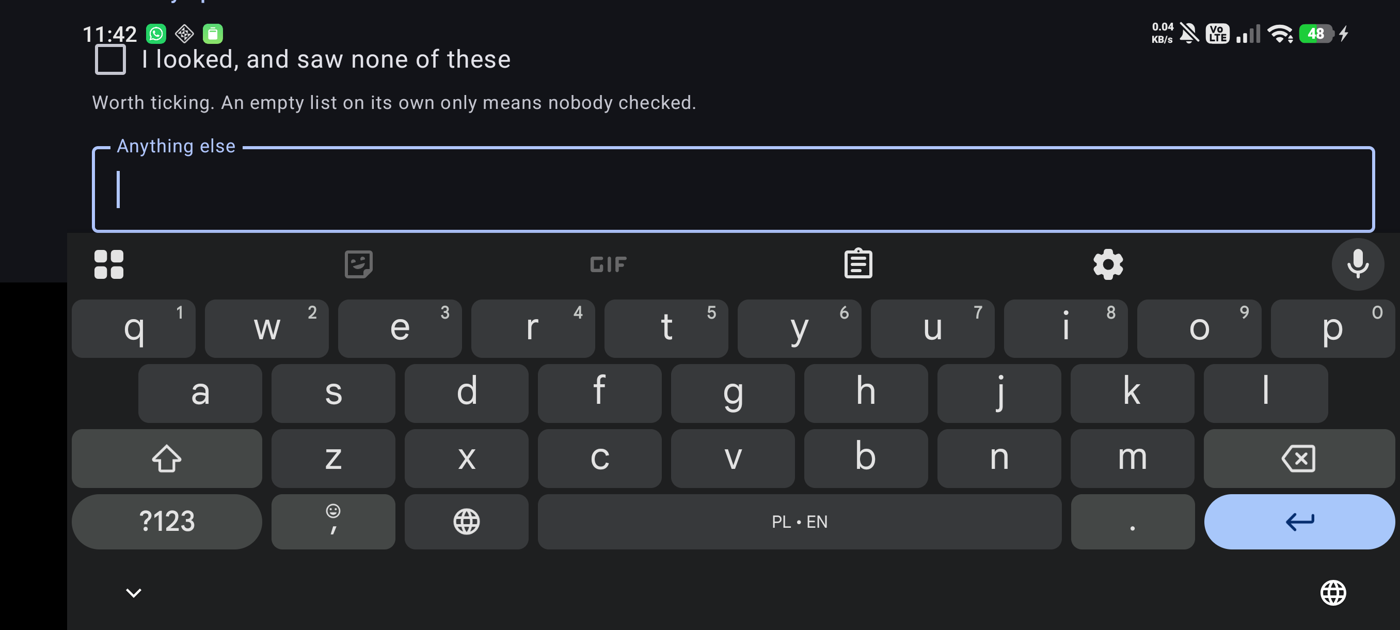
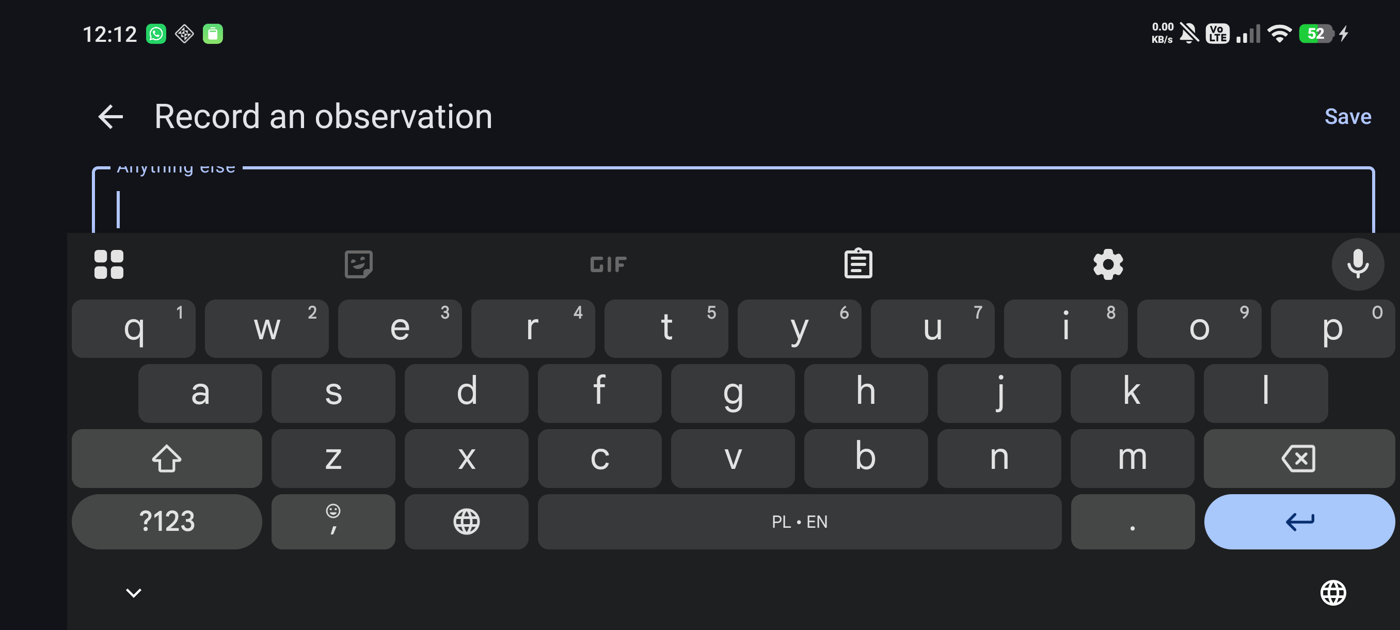
Fixed in two halves, because one is not enough:
Modifier.padding(insets).consumeWindowInsets(insets).imePadding()onNavDisplay, in both the shell and the setup wizard.consumeWindowInsetsbeforeimePaddingis what stops it double-counting — the keyboard’s inset is measured from the bottom of the screen, so it already contains the navigation bar height thatpadding(insets)just applied.SOFT_INPUT_ADJUST_NOTHING, set on API 30+ only, inMainActivity.imePadding()alone did not stop the pan; the system had to be told to stop asking. It is a runtime call rather than a manifest edit because the manifest cannot say “only on new enough Android”, andadjustResizeis still load-bearing below 30 — see the coverage note at the end.
2. The one bottom sheet could not scroll, and ran under the navigation bar
The reminders opt-in sheet’s content is taller than any phone screen. It had no scroll, so everything past the fold was permanently unreachable, and the autostart explanation ran under the three-button bar with the navigation icons drawn over the words.
A sheet is its own window, so the shell’s Scaffold pads none of it — this is the one family that cannot
inherit the fix that covers everything else. Given verticalScroll and navigationBarsPadding(), the sheet
now scrolls, and its last control comes to rest 155px clear of the bar.
This host is behind BuildConfig.DEBUG. The same composable has two other hosts that are not — the Care
screen’s inline point-of-use ask (4c) and the wizard’s third step — and neither is a sheet, so no released
build showed this. It is fixed anyway: it is the app’s only ModalBottomSheet, which makes it the only
evidence there is for how a sheet behaves here, and the next one would have inherited the pattern.
What it cleared
Everything else, in all four cells: the five tabs, the detail routes, the forms, the photo gallery and the
chart, the dialogs and date pickers and dropdown menus. Every scroll-to-end scene rests clear of every bar.
The scenes are listed in SCENES in the script.
The two chrome-free outliers, which had the most to prove because neither has a Scaffold to inherit from,
both hold:
- The first-run wizard — all three steps, plus empty Home behind them, clean in every cell. Captured
against a genuinely wiped install (
--suite empty), which is the only honest way to see them. -
SchemaMismatchScreen— clean in every cell, and itssafeDrawingPadding()is applied outside itsverticalScroll, so the viewport is inset and content never scrolls under a bar. It is worth checking at the end of its scroll and not only at the top: this is the one screen an owner cannot get past without pressing its button, and in landscape that button starts below the fold. It is reachable.Reaching this screen at all means lying to ADR-0007’s guard, which reads SQLite’s own
user_version— four big-endian bytes at offset 60 of the file header.--suite mismatchwrites a version nothing recognises, captures the screen, and puts the file back; nothing consents to the wipe.
What this does not cover
Stated plainly, because a checkpoint whose output is evidence should be honest about the evidence’s edges.
- API 26–29 has not been exercised on a device.
WindowInsets.imeis not reported before API 30, so the older half of the supported range still depends on the manifest’sadjustResizeactually resizing the window. That is why theADJUST_NOTHINGoverride is gated to 30+ rather than applied to everything — but the pre-30 path is reasoned about here, not observed. - One device, one cutout shape. A waterfall display or a wider notch changes the rectangles, not the structure; the structure is what the families check.
- Tablets and unfolded foldables are in scope for the app (Android 16 ignores orientation restrictions on large screens) and were not tested — there is no such device here.
- The screenshots are not in the repository, bar the two above. The full matrix is about 150 images and regenerating it is one command; what is committed is the pair that cannot be regenerated, because the defect it shows is fixed.
Running it again
scripts/edge-to-edge.py --out DIR                  # the whole matrix, against seeded sample data
scripts/edge-to-edge.py --out DIR --suite empty    # WIPES the app: the first-run wizard and empty states
scripts/edge-to-edge.py --out DIR --suite mismatch # fakes a schema version to reach SchemaMismatchScreen
scripts/edge-to-edge.py --restore                  # hand rotation and navigation mode back to the phone
The full suite expects the debug sample data (Settings › Sample data), which seeds two bonded bunnies, a
year of weighings, care reminders and an already-expired watch — so the screens have something to render and
the watch-expiry prompt is on screen to be captured.